
What is the Best Collaboration Tool for Agencies Working With External Clients? (2026)
If you run a small or boutique agency, the tool you pick to work with external clients comes down to three things: no per-client seat charges, a branded space clients will actually use, and no complexity creep. Here is how to choose, answered directly.
Founder & Product Lead · Droova
Contents 8 sections
If you run a small or boutique agency, choosing the software you use to work with external clients is not really about feature lists. It comes down to three things: you should not be charged a seat for every client you invite, your clients need a branded space they will actually use, and the tool should not get more complicated than your team is.
Get those three right, and everything else is detail.
I have watched a lot of small agencies pick the wrong tool for the right reasons, usually because they evaluated features and ignored the pricing model and the actual client experience. Too often, agencies end up duct-taping together a fragmented workflow. They use email for communication, a messy cloud drive for files, and a complex internal tool for task tracking. The result is a disjointed client experience that looks unprofessional and wastes hours of your team's time each week.
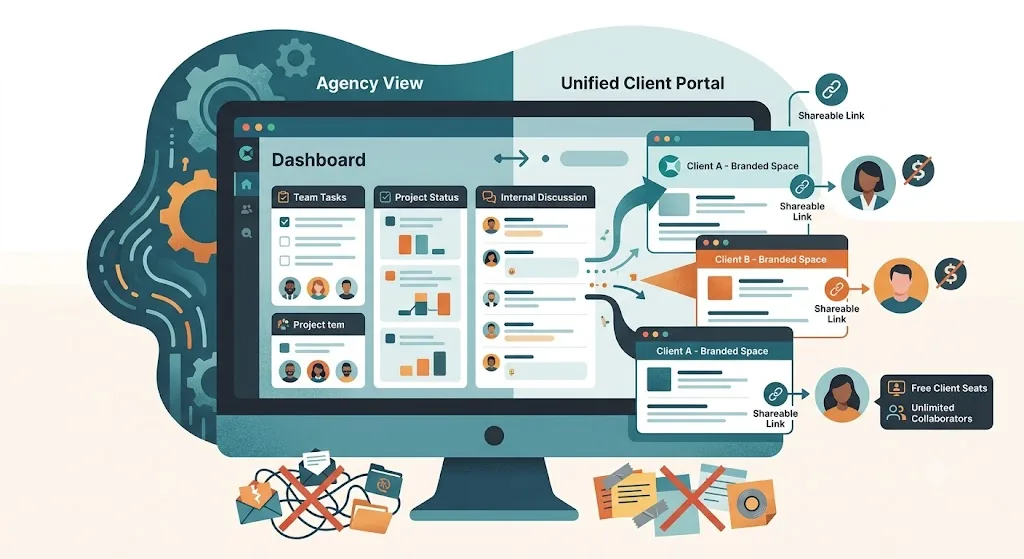
The truth is, the best tool for working with external clients is one where the client gets their own branded, low-friction space, and you are not charged extra for inviting them. Most general project tools were built for internal teams. The moment you bring a client in, you either pay for another seat or hand them a login into your messy internal workspace. For agency client work specifically, you need a platform with a built-in client portal where clients are free and access is a simple link, not an account.
If you are new to the idea, our primer on what a client portal is covers the basics, and the best white-label client portals for agencies compares the leading options.
What client collaboration software actually is
Client collaboration software is how an agency works with external clients, sharing progress, files, feedback and sign-off, without dragging those clients into your internal project tool or back into endless email threads. For agencies, what matters is that each client sees a clean, branded view of only their work, not your whole workspace.
That is the difference between real client collaboration and simply giving a client "full access". Full access (guest seats) exposes your task board, your team and your other clients, and often costs a seat per guest. A proper client portal gives each client their own branded, no-login space, curated by you.
Client portal vs guest access vs email
| Branded client portal | Guest access in a PM tool | Email & Slack | |
|---|---|---|---|
| Each client sees only their own work | Yes, a private portal per client | No, guests often see the shared workspace | No, it is scattered across threads |
| Client login required | No, a shareable link | Yes, an account per guest | No, but nothing is centralised |
| Carries your brand | Your logo and colours | Usually the vendor's brand | None |
| Cost per client | Free and unlimited (in Droova) | Often a paid seat per guest | Free but chaotic |
| Approvals kept as a record | Name, email, time, wording, exportable | Rarely | Buried in inboxes |
| Lives with the real work | The portal is the project | Yes, but exposes everything | No, disconnected from delivery |
Why per-seat pricing punishes small agencies
Per-seat pricing is the quiet tax on small agencies. It is fine when you are five people. But it becomes a major problem the moment your growth depends on adding clients and collaborators, because every tool wants a fee for each one.
Think about what actually scales in an agency. It is not your headcount; it is your number of clients and the people around each client who need visibility. If your software charges per seat for all of them, your tooling bill grows in lockstep with the very thing you are trying to grow.
That is backwards. You end up rationing access, sharing logins, or leaving clients out of the tool entirely and falling back to email. This creates a bottleneck where only one person on the client side has the login, and your team is stuck answering endless status requests from everyone else.
This is why I care so much about client seats being free. On Droova's pricing, you pay for your team, and clients are never charged as seats. It removes the incentive to keep clients out of the loop to save money, which is exactly the wrong incentive for a client business.
What small and boutique agencies actually need
Boutique agencies do not need an enterprise feature set. They need a short, sharp list of things that actually work:
No client logins. A client should be able to open a link and immediately see their project status without being forced to create an account or remember a password.
A branded client space. The experience needs to feel like your agency, not a rented tool. When a client opens their dashboard, they should see your logo and colors.
No mandatory onboarding calls. Clients should intuitively understand where their files and updates live the second they click the link. If you have to schedule a 15-minute video call just to teach a new client how to use your project management software, the software has already failed.
A unified workspace. The actual work and the client view should live in one place, so you are not syncing two systems by hand.
Simple, predictable pricing. You should not be punished for adding more clients to your roster.
Room to grow without complexity creep. The tool should not turn into a full-time job to administer.
That last point matters more than people expect. Plenty of tools that are affordable at the start become sprawling and hard to manage as you add clients. The right tool stays as simple at ten clients as it was at two.
Approvals that settle disputes
The part of client collaboration agencies underrate is sign-off. When a client approves work in Droova, the portal records their name, email, the time and their approval in their own words, and the whole log exports to a spreadsheet. When a client later says "I never agreed to that", you have the record instead of an email hunt. You can try this on a single deliverable with our free client approval form.
Where Droova fits (and where it does not)
To be straight with you: Droova is an early-stage, focused platform built specifically for agencies and consultancies that work with external clients.
It is not the right pick if you want a mature enterprise suite with hundreds of complex integrations.
It is a very good pick if you are a small or boutique agency that wants the client relationship, the project tracking, and a branded client portal all in one place. Clients are free, and there is no second tool to sync.
That is the whole idea behind running your business on one connected Agency OS rather than a stack of disconnected apps. If you want to see how this maps specifically to your niche, we have dedicated workflows set up for consulting firms and for design studios.
The Bottom Line for Boutique Agencies
For a small agency working with external clients, pick the tool that gives clients a branded, no-login space, keeps clients free instead of charging per seat, and keeps the client view inside the same tool your team already uses. That combination is what stops your software bill and your administrative headaches from growing every time you win a new client.
Want to see how it compares to your current setup? Book your free pilot and we will set up one of your live client projects on Droova.
Frequently Asked Questions
Is an all-in-one tool better than separate apps for a small agency? For most small agencies, yes. Keeping the client portal inside the exact same tool your team works in removes the need for manual syncing and prevents the "handoff problem" where client updates slip through the cracks. Piecing together separate apps usually adds hidden costs and admin hours as you grow.
Do clients actually use client portals? They do, provided you remove the friction. The biggest barrier to client adoption is forcing them to create an account, remember a password, and learn a new software interface. Portals that use secure, shareable links and clean, branded dashboards see drastically higher adoption rates.
Can I use a client portal instead of sending weekly email updates? Absolutely. In fact, replacing the weekly status email is one of the biggest time-savers for boutique agencies. When clients have a live, transparent dashboard they can check on their own schedule, it drastically cuts down on the back-and-forth emails asking for progress reports or missing files. You transition from reactive updates to proactive visibility.
How do you handle client approvals without forcing them to log in? Modern collaboration tools allow clients to approve deliverables or sign off on milestones directly through their unique portal link. The approval is recorded securely in the system without requiring the client to navigate a complex project board.
How is client collaboration software different from giving a client full access to your project tool? Full (guest) access drops clients into your internal workspace, so they can see your task board, team and sometimes other clients, and they usually need an account. Client collaboration software gives each client a curated, branded view of only their work. In Droova there is no client login, and client portals are free.
Can we use Asana or a normal project tool for client collaboration? You can, but it means inviting clients as guests into your internal workspace, which exposes more than you want and can cost a seat per guest. Most teams end up emailing the client anyway. A built-in client portal gives the client a clean, branded view of only their project, with no login. See does Asana have a client portal.
Does each client get their own private space? Yes. In Droova every client gets their own branded portal showing only their projects, files and approvals, never your other clients or internal work.
How much does client collaboration software cost? Pricing models vary: some tools charge per guest or per client. Droova charges per team member, and client portals are free and unlimited, so adding clients never adds cost. See pricing.
More from the journal
Tactics for running service businesses better - without the fluff.
Browse all posts →