
5 Tabs and a Spreadsheet: Why the Agency Stack That 'Works Fine' Falls Apart as You Scale
A field note from the demos I sit in on: the cheap tool setup that works fine at a handful of clients quietly breaks as you scale. Here is the exact pattern I keep seeing, and the fix.
Founder & Product Lead · Droova
Contents 10 sections
People ask me some version of the same question all the time: do I actually need project management software with a client portal, or can I keep running things the way I do now, a couple of cheap tools and a spreadsheet? My honest answer is that you can keep the duct-taped setup for a while. It works fine, right up until the day it very suddenly does not. And I can almost always see that day coming before they can.
I get to sit in on a lot of demos now. Before I show anyone Droova, I ask them to walk me through how they run their work today. That five-minute walkthrough tells me more about an agency than any discovery form ever could, and there is one pattern I see so often it has stopped surprising me.
The demo that made the pattern obvious
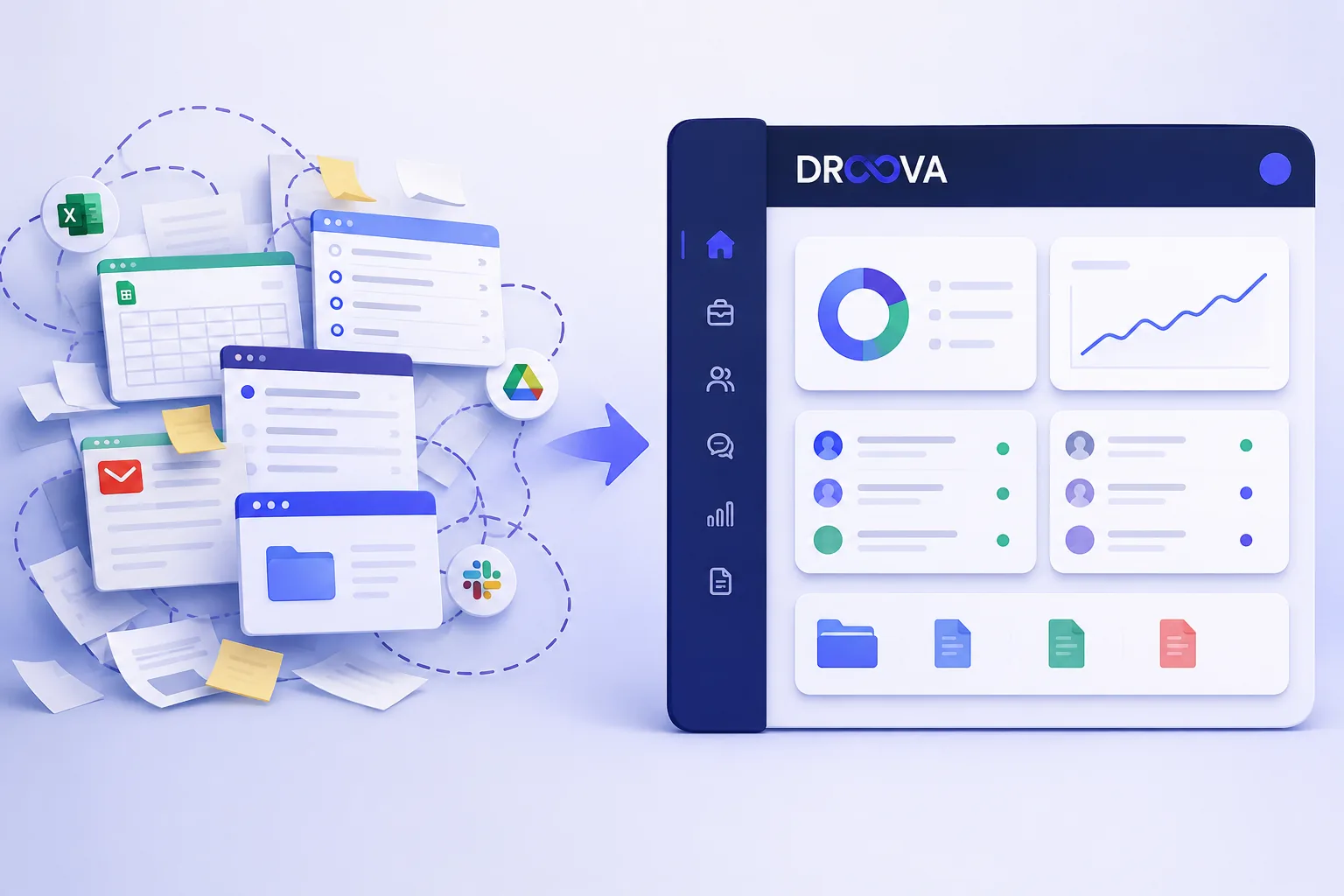
One walkthrough stuck with me. I asked the founder to show me how a normal project actually moves through their shop. What I watched was this: five browser tabs open at once. A project tool in one. A spreadsheet tracking clients and deadlines in another. A separate doc for client notes. Email in a third tab. A shared drive for files in a fourth. And in between all of it, the thing that gave the whole game away, constant manual copy and paste. A status changes in the project tool, so it gets typed again into the spreadsheet. A client sends an update by email, so it gets pasted into the notes doc. A deliverable is ready, so it gets uploaded to the drive and then a link gets pasted into an email.
None of it was broken, exactly. The work was getting done. But it was mind-numbing, and it took far more time than the actual work deserved. By the end of the day this team had spent a big chunk of their hours just moving information between tools so that each tool stayed roughly up to date. That is not project management. That is being a human integration between apps that were never meant to talk to each other.
Why the cheap stack feels fine at first
Here is the trap, and it is a fair one to fall into. When you are small, the DIY stack genuinely works. With three or four clients, the copy-paste tax is a few minutes a day. The spreadsheet is short enough that you can hold the whole thing in your head. If something slips, you catch it, because there is not much to catch. Every cheap tool you bolt on solved a real problem the day you added it, so the setup feels not just acceptable but smart. You are being frugal. You are not paying for some big all-in-one platform you do not need yet.
And that logic holds, at low volume. The problem is that the cost of this setup does not scale in a straight line. It scales against you.
The two costs that grow silently as you scale
As the workload gets heavier, two costs start compounding quietly in the background. Most agencies do not notice them until they are already expensive.
1. The sync tax
Every tool you run in parallel has to be kept in sync with the others by hand. At four clients that is minutes. At fifteen, with several tools each, it is a real part of someone's job. The maths is unkind: the number of hand-offs between your tools grows much faster than the number of clients. Double the clients and you more than double the copy-paste. Nobody budgets for this, because it never shows up as a line item. It just eats afternoons.
2. The data-integrity risk
This is the one that actually hurts, and it is the one people underestimate. When information lives in five places and moves between them by hand, some of it does not make the trip. A deadline gets updated in the project tool but not the spreadsheet. A client's change request gets read in email and never written down anywhere. A note gets typed in a hurry and left half-finished. None of these feel like a big deal in the moment. But each one is a small crack, and as you scale you are opening cracks faster than you can close them.
The result is the thing every growing agency dreads: something falls through. A deliverable that a client swears they asked for. A deadline nobody was tracking in the tool that mattered. A status the account manager gave from memory because the real answer was scattered across three tabs. When you are small you catch these. When you are busy and scaling, you do not, and the first time one reaches a client, it costs you far more than any software subscription ever would.
The tipping point nobody plans for
There is a moment, and it is different for every agency but it always arrives, where the setup that was frugal becomes the setup that is holding you back. Usually it is not a dramatic collapse. It is a quiet realisation. You hire someone and it takes weeks to explain where everything lives, because the answer is genuinely complicated. A client asks a simple question, where are we on this, and it takes three tabs and a Slack message to answer. You look at a Friday afternoon and realise the team spent it updating tools rather than doing work worth billing for. That is the tipping point. The stack did not fail. It just stopped being worth what it costs you, and the cost was never really the subscriptions. It was the time and the risk.
What project management software with a client portal actually solves
This is where the question I opened with finally answers itself. The reason to move to project management software with a built-in client portal is not that it has more features. It is that it collapses the copy-paste. When your projects, your client updates, your files and the client-facing view of all of it live in one system, there is nothing to sync, because there is no second place for the information to be. The client portal is not a separate app you keep up to date. It is just your real project, shared, showing the client exactly what you choose to surface.
That single change removes both of the costs above at once. The sync tax goes to zero, because there is one source of truth instead of five. And the data-integrity risk collapses, because information is entered once, in one place, and everyone, including the client, is looking at the same thing. You are no longer the human integration layer. You get to go back to doing the work.
If you want the fuller argument for consolidating, I have written about the tax of running six or seven tools and why agencies outgrow ClickUp, Asana and Notion. The short version is that the answer is rarely one more tool. It is fewer tools that actually talk to each other, ideally one operating system for the whole agency where the client portal is part of the same platform your team already works in.
Not sure whether you have crossed the tipping point yet? Run your current setup through our free agency stack audit. It takes a couple of minutes and shows you, in real numbers, what your tabs and spreadsheets are quietly costing you in time and risk.
The "integration tax" - the invisible line item nobody adds up
The reflex response to fragmentation is integration. "Just connect them all." Zapier, Make, native integrations. Surface-level, this works. Beneath the surface, it adds a new tax:
Zapier subscriptions: $20-99/month per agency, often duplicated
Sync fragility: a Zap breaks silently, you find out two weeks later when a client mentions a missing task
Two-way conflicts: when two tools both think they're authoritative, you get phantom records and duplicate notifications
Maintenance overhead: 1-2 people on your team become the "Zap whisperers" who fix things when they break
This is the integration tax. It's real and it's significant and crucially, it's worse than the fragmentation it's trying to solve, because now your operations depend on a brittle layer of glue most of your team can't see and can't fix.
What "unified operations" actually looks like
The alternative is a different mental model. Instead of "what tool do I use for X?", you think "what's the next stage of the engagement?" Lead → project → portal → support → renewal - one workspace, one source of truth, one branded surface for the client.
This is the Agency OS idea. Pipeline, projects, client portal, and reporting living natively in the same database so the handoffs between them are instant and lossless. No Zaps. No manual data assembly. No "did the project get created?" panic when a deal closes.
It's also the reason this is hard to retrofit onto a PM tool with bolt-on integrations. Either everything is one product, or you're paying the integration tax.
How to tell if you have crossed the line
You do not need me to sit in on your demo to work this out. Ask yourself these, honestly:
- If a client emailed right now asking where are we on this, could you answer accurately in under a minute, without opening more than one tool?
- Is the same piece of information, a deadline, a status, a client detail, typed into more than one place?
- In the last month, did anything reach a client late or wrong because it lived in the wrong tab?
- If your best account manager left tomorrow, is the state of every project actually written down, or is some of it in their head?
- Roughly how many hours a week does your team spend updating tools rather than doing the work clients pay for?
If more than one of those made you wince, the cheap stack has already stopped being cheap. You are paying for it, just not on an invoice.
The one-sentence version
The tool setup that works fine at five clients is the same setup that quietly breaks at fifteen, not because any single tool is bad, but because keeping five of them in sync by hand costs you more time and more risk with every client you add. The fix is not another tool. It is one system where the work and the client's view of it live in the same place, so nothing has to be copied, pasted, or remembered.
If you want to see what that looks like with your own workflow, start with the stack audit to put a number on the problem, or book a 30-minute demo and bring a live project. I would rather show you than tell you.
Frequently Asked Questions
Do I really need project management software with a client portal, or can I keep using spreadsheets?
You can keep a spreadsheet-and-tabs setup while your volume is low and you can hold everything in your head. It usually stops working as you scale, because keeping several tools in sync by hand costs more time and creates more risk with every client you add. A tool with a built-in client portal removes that by keeping the work and the client's view of it in one place.
What is the real cost of running my agency across multiple separate tools?
Two costs that do not show up on any invoice: the time your team spends copying information between tools to keep them in sync, and the risk that some of that information does not make the trip, leading to missed deadlines, wrong statuses, and things that reach clients late or incorrect. Both grow faster than your client count.
When should an agency switch from a DIY stack to a single system?
The signal is not a specific number of clients, it is friction. When you cannot answer where are we on this without opening several tools, when the same detail lives in more than one place, or when things start falling through the cracks because they lived in the wrong tab, you have crossed the tipping point.
Why not just add another tool to fix the gaps?
Because every tool you add is one more thing to keep in sync. The problem is rarely a missing feature, it is fragmentation. Adding tools usually widens the gaps it is meant to close. Consolidating into fewer tools that actually share data does the opposite.
How do I find out what my current setup is costing me?
Run it through a stack audit. Our free agency stack audit takes a couple of minutes and turns your current tools and hand-offs into real numbers for time lost and risk carried, so you can decide with data rather than a gut feeling.
More from the journal
Tactics for running service businesses better - without the fluff.
Browse all posts →