
Best CRM with Project Management in 2026: Complete Guide
Most teams use one tool for managing clients and another for managing projects. A CRM with built-in project management keeps the entire client lifecycle in one place. Here's how to choose the right one.
Contents 8 sections
Most teams use one tool for managing clients and another for managing projects. The result: leads get lost in the handoff, project context disappears, and your team wastes hours copying data between systems that should be connected.
A CRM with built-in project management solves this by keeping the entire client lifecycle in one place. From first contact to project delivery to ongoing support, everything stays connected.
This guide breaks down what to look for, compares the top tools with honest pros and cons, and helps you pick the right one for your team in 2026.
What Is a CRM with Project Management?
A traditional CRM (Customer Relationship Management) tracks leads, deals, contacts, and sales activities. A traditional PM (Project Management) tool tracks tasks, deadlines, assignments, and deliverables.
A CRM with project management combines both capabilities. Instead of managing clients in HubSpot and projects in Asana, you handle the full lifecycle in one system:
- Lead comes in through your website, referral, or outreach campaign
- Sales team qualifies the lead with tracked calls, emails, and follow-ups
- Lead converts to a project with all context and history preserved
- Team delivers the project with tasks, deadlines, and progress tracking
- Client sees progress through a portal or shared view without needing an account
- Support handles issues that arise during or after delivery
The key word is "converts." When a lead becomes a project, the transition should be seamless. Your delivery team should see everything the sales team learned: goals, budget, timeline, preferences, and what was promised.
Why Teams Need Both in One Platform
Context Doesn't Survive the Handoff
When sales closes a deal in HubSpot and someone manually creates a project in Asana, the context from the sales process gets lost. What did the client ask for? What was promised? What's the budget? What are their communication preferences? Your project team starts from incomplete information, and the client notices.
We've seen this pattern repeatedly: the client says "I already told your team this" during the kickoff call. That's a trust-damaging moment that happens because your CRM and PM tool don't share data.
Cost of Multiple Subscriptions
A typical agency tool stack looks like this:
- CRM: $15-50/user/month (HubSpot, Pipedrive, Salesforce)
- Project management: $10-25/user/month (Asana, ClickUp, Monday)
- Client portal: $10-20/user/month (dedicated portal tools)
- Time tracking: $5-15/user/month (Harvest, Toggl, Clockify)
- Support tickets: $10-25/user/month (Zendesk, Freshdesk)
For a 20-person team, that's $1,000-2,700/month before you've done any actual work. And that doesn't count the time spent maintaining integrations between these tools, which often break silently.
A unified platform can cut this stack to a single subscription while actually improving data quality because there's no integration layer to maintain.
Reporting Becomes Possible
When lead data and project data live in the same system, you can answer questions that actually drive business decisions:
- What's our conversion rate from lead to completed project?
- Which lead sources produce the highest-value projects?
- What's our average project margin by client type?
- How long does it take from first contact to project delivery?
- Which types of projects have the highest client satisfaction?
- How many follow-up calls does it take to close a deal by service type?
These insights are nearly impossible when your data is split across multiple tools. You'd need to export data from each, match records manually, and build reports in spreadsheets. Most teams try this once and give up.
What to Look for in a Combined Platform
Not all "CRM with project management" tools are created equal. Some bolt on basic tasks to a CRM. Others add a simple contact list to a PM tool. Here's what actually matters:
Native Lead Pipeline
The CRM should have a real pipeline with customizable stages, not just a list of contacts. You need to track where each lead is, what the next action is, and when it's due. Bonus points for call tracking with scheduled calls, outcomes, and duration logging.
Lead-to-Project Conversion
This is the critical feature. When a deal closes, can you convert it to a project with one click? Does the project inherit the client's information, deal notes, and any documents shared during the sales process? Or do you have to manually recreate everything?
Client Visibility
Can clients see project progress without creating an account or learning a new tool? The best implementations use a shareable link that clients can bookmark. No login, no training, no friction. Even better if the view is branded with your logo and colors.
Support Ticket Integration
Projects don't end at delivery. Clients have questions, find issues, and request changes. A built-in ticket system linked to projects means nothing falls through the cracks after handoff.
White-Label Branding
For agencies, how your tools look to clients matters. If a client logs into a portal and sees another company's logo, it dilutes your brand. White-label branding lets you present the entire experience as your own platform.
Best CRM with Project Management Tools (2026)
Here's an honest breakdown of the top platforms that combine CRM and project management capabilities. We've evaluated each based on how well the two sides actually integrate, not just whether both features exist somewhere in the product.
Droova
Best for: Agencies, consultancies, and service businesses who need the full client lifecycle in one tool
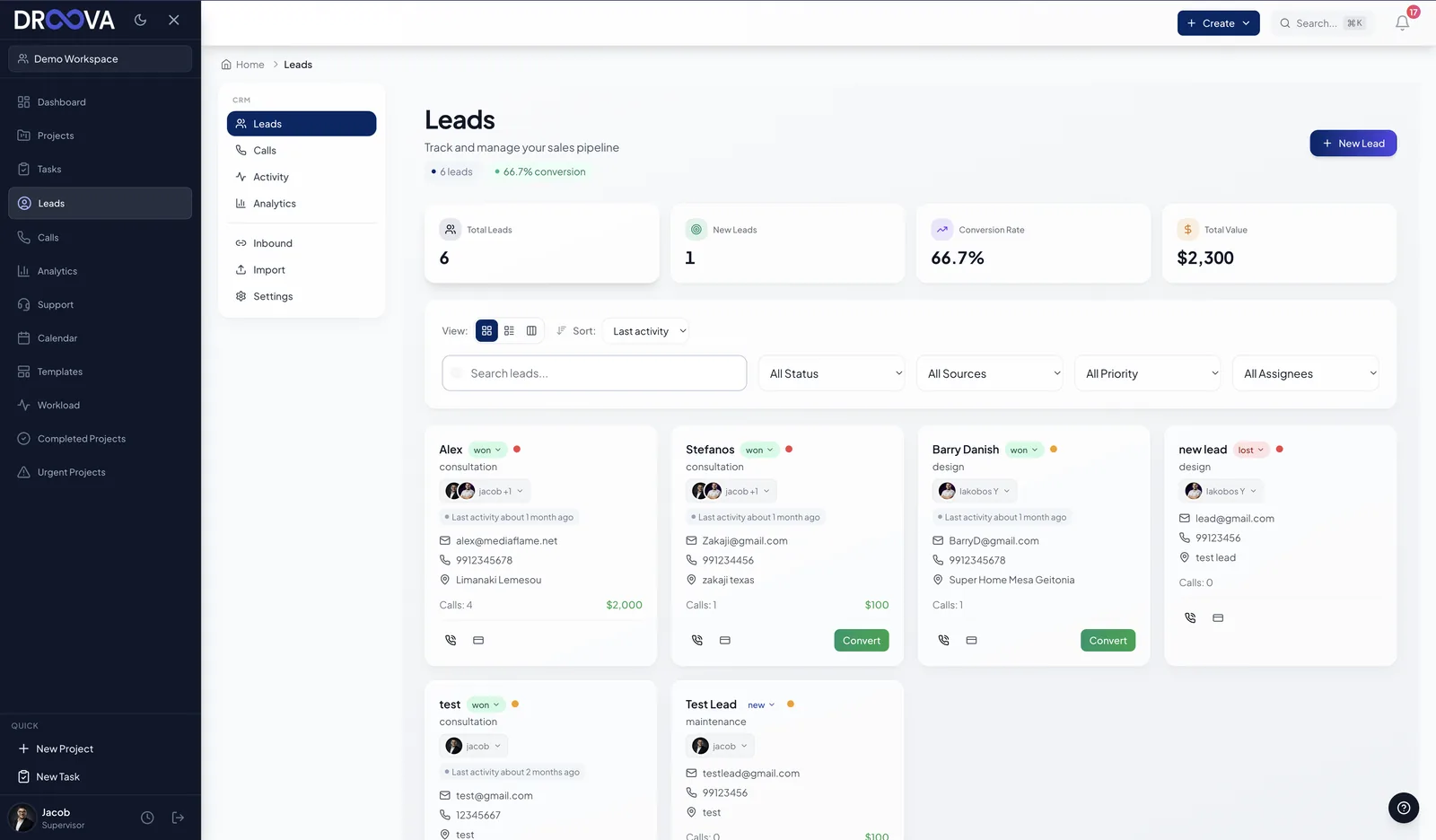
Droova was purpose-built for teams who manage both client relationships and project delivery. It's the only tool on this list that includes a white-label client portal, CRM with call tracking, project management, and support tickets in a single platform with no add-ons or separate subscriptions.
CRM features:
- Lead pipeline with customizable stages (new, contacted, qualified, proposal sent, won, lost)
- Call scheduling and tracking with outcomes, duration logging, and conversion analytics
- Follow-up date tracking with reminders and lead assignment
- Lead source tracking (website, referral, cold call, social media, advertisement)
- Estimated deal value and service type categorization
- Convert won leads directly to projects with all context preserved
Project management features:
- Kanban boards, list views, and calendar views
- Tasks with subtasks, priorities, deadlines, and bulk operations
- Built-in time tracking with start/stop timer and logged entries
- AI-powered project creation and template generation
- Project templates for repeatable workflows
- File attachments and task comments
What makes it unique:
- Client portal: Share project progress via a branded link. Clients view tasks, files, and submit feedback without creating an account. Optional password protection and expiring links.
- White-label branding: Each workspace gets your logo, primary and secondary colors, and company name. The client portal, shared views, and all client-facing screens use your branding.
- Lead-to-project conversion: Won leads become projects with one click. All client context carries over automatically.
- Support tickets: Built-in ticket system linked to projects. Client feedback can be converted to tickets with status tracking.
See all features | Book a demo
HubSpot
Best for: Marketing-heavy teams who need CRM first and project management second
HubSpot is the industry leader in CRM with excellent marketing automation, email sequences, deal management, and reporting. The platform has expanded significantly and now includes content management, customer service, and operations tools.
However, HubSpot's project management capabilities remain basic. The "Tasks" feature is designed for sales follow-ups, not complex project delivery. Most teams pair HubSpot with a separate PM tool, which defeats the purpose of having both in one platform.
CRM: Industry-leading. Contact management, deal pipeline, email tracking, marketing automation, sequences, reporting dashboards, website analytics.
PM: Basic task management added recently. Suitable for simple internal tasks. Not sufficient as a standalone PM tool for client project delivery.
Client portal: Customer portal available on Service Hub Professional ($100/month). Limited customization.
White-label: Not available on standard plans. Limited on Enterprise.
Pricing: Free CRM tier available. Marketing Hub starts at $15/month. Full stack (Marketing + Sales + Service + CMS) can exceed $150/user/month for professional features.
ClickUp
Best for: Teams who want powerful PM and are willing to build their own CRM
ClickUp has best-in-class project management with incredible customization options. You can build a CRM using custom fields, automations, and list views. Many teams have done this successfully, and there are templates available to get started.
The trade-off is maintenance. Your custom CRM won't have features like call tracking, lead scoring, or pipeline analytics out of the box. You're building and maintaining a system rather than using one. And when something breaks in your automations, you're the one debugging it.
CRM: Custom-built using lists, custom fields, and automations. Not a native feature. No call tracking or pipeline analytics.
PM: Excellent. Highly customizable with multiple views, automations, and 1000+ integrations.
Client portal: Not available.
White-label: Not available.
Pricing: Free tier available. Unlimited plan at $7/user/month. Business at $12/user/month.
Read more: Droova vs ClickUp
Monday.com
Best for: Teams who want visual project boards and a polished CRM as a separate product
Monday.com offers both a Work Management product and a separate Sales CRM product. They integrate with each other through automations and cross-board linking, but you're managing two products and two subscriptions. The experience feels like two tools that communicate, not one unified platform.
The CRM side is well-designed with deal tracking, contact management, and email integration. The PM side has strong visual boards, automations, and dashboards. The gap is in the transition between them.
CRM: Monday Sales CRM (separate product, $12+/seat/month). Deal tracking, contact management, email integration, activity tracking.
PM: Strong visual boards, automations, dashboards, time tracking (on higher plans).
Client portal: Not available.
White-label: Not available.
Pricing: Work Management starts at $9/seat/month (min 3 seats). CRM is additional.
Read more: Droova vs Monday.com
Teamwork
Best for: Agencies who need PM with basic client access and time tracking
Teamwork is designed for agencies with features like client user roles, time tracking, resource management, and profitability reporting. It's a solid PM tool that understands agency workflows. However, it doesn't include CRM or lead management natively. You'd need a separate tool for sales.
The client access model requires clients to create accounts and log in, which adds friction compared to a simple shared link approach. Some clients resist creating yet another account.
CRM: Separate product (Teamwork CRM). Not deeply integrated with the PM product.
PM: Good. Agency-focused with time tracking, invoicing, and profitability reporting.
Client access: Yes, via user roles (requires client accounts).
White-label: Not available.
Pricing: Free tier for up to 5 users. Deliver plan at $10.99/user/month. Scale at $19.99/user/month.
Salesforce
Best for: Enterprise teams with complex sales processes and dedicated admin teams
Salesforce is the most powerful CRM on the market with virtually unlimited customization. But it's not a project management tool. Teams typically pair it with Asana, Monday, or a custom solution for PM. Setup and customization require dedicated Salesforce administrators or external consultants, which adds significant cost.
For small to mid-size agencies, Salesforce is usually overkill. The licensing costs, implementation time, and ongoing admin requirements don't justify the investment unless you have 50+ users and complex sales processes.
CRM: Industry-leading for enterprise. Highly customizable with AppExchange marketplace. Requires admin expertise.
PM: Not available natively. Requires third-party integration or AppExchange add-ons like TaskRay.
Client portal: Experience Cloud (expensive, complex setup, typically $25-300/user/month).
Pricing: Essentials at $25/user/month. Professional at $80/user/month. Enterprise at $165/user/month. Implementation costs $5k-100k+ depending on complexity.
Comparison Table
| Tool | Native CRM | Native PM | Client Portal | White-Label | Lead-to-Project | Call Tracking |
|---|---|---|---|---|---|---|
| Droova | Yes | Yes | Yes (no login) | Yes | Yes | Yes |
| HubSpot | Yes | Basic | Paid add-on | Limited | No | Paid add-on |
| ClickUp | DIY | Yes | No | No | No | No |
| Monday.com | Separate $ | Yes | No | No | Partial | No |
| Teamwork | Separate $ | Yes | Partial | No | No | No |
| Salesforce | Yes | No | Enterprise $$$ | Limited | Custom build | Paid add-on |
How to Choose the Right CRM with Project Management
Here's a decision framework based on your team's primary needs:
- You need everything in one platform (CRM + PM + client portal + branding + tickets): Droova
- CRM and marketing automation are your priority and PM is secondary: HubSpot
- PM is your priority and you'll build or bolt on CRM functionality: ClickUp
- You want visual boards and can budget for separate CRM and PM products: Monday.com
- You need agency-focused PM with time tracking and profitability: Teamwork
- You're an enterprise with 50+ users and a dedicated admin team: Salesforce
Implementation Tips
Start with the Lead Pipeline
Before migrating project data, set up your lead pipeline first. Define stages, import your current leads, and get the sales team using it for 2 weeks before adding project management. This gives you a clean foundation.
Migrate Gradually
Don't try to move everything at once. Start with new projects in the new system while finishing existing projects in the old one. This avoids the chaos of a big-bang migration and lets your team learn the new tool with fresh projects.
Define the Handoff Process
Before going live, document exactly what happens when a lead converts to a project. Who creates the project? What information transfers automatically? What needs to be added manually? Who notifies the client? Clear handoff processes prevent the exact problems you're trying to solve.
Train on the Full Lifecycle
Don't just train sales on the CRM and delivery on the PM. Train everyone on the full lifecycle so they understand how their work connects. When a project manager understands the sales process, they deliver better. When a salesperson understands project delivery, they sell more realistically.
Key Takeaways
The gap between CRM and project management is where deals and client relationships fall apart. Agencies lose context in the handoff, miss follow-ups because they're tracked in different tools, and can't report on the full client lifecycle because the data is scattered.
The solution isn't buying more tools or building more integrations. It's finding one platform that handles both sides well. For agencies and service businesses, that means looking for built-in CRM with call tracking, solid project management with multiple views, and ideally a client-facing portal that lets clients see progress without asking for updates.
Droova was built to close this gap. Book a demo to see how it handles your specific workflow, or explore our full tool comparison guide.
More from the journal
Tactics for running service businesses better - without the fluff.
Browse all posts →