
CRM for Agencies: Do You Actually Need One in 2026?
Do agencies actually need a CRM? This guide covers when you need one, why generic CRMs fail for agencies, what features matter, and how to implement without your team ignoring it.
Contents 9 sections
Most agency founders resist getting a CRM. The reasoning makes sense on the surface: "We only have 15 clients, I know them all by name, and our spreadsheet works fine." Then you lose a deal because nobody followed up, or a client churns because the handoff from sales to delivery dropped critical context.
The question is not whether your agency needs a CRM. The question is whether you are already paying the cost of not having one - in lost deals, dropped follow-ups, and context that disappears when it moves between people.
What a CRM Actually Does for an Agency
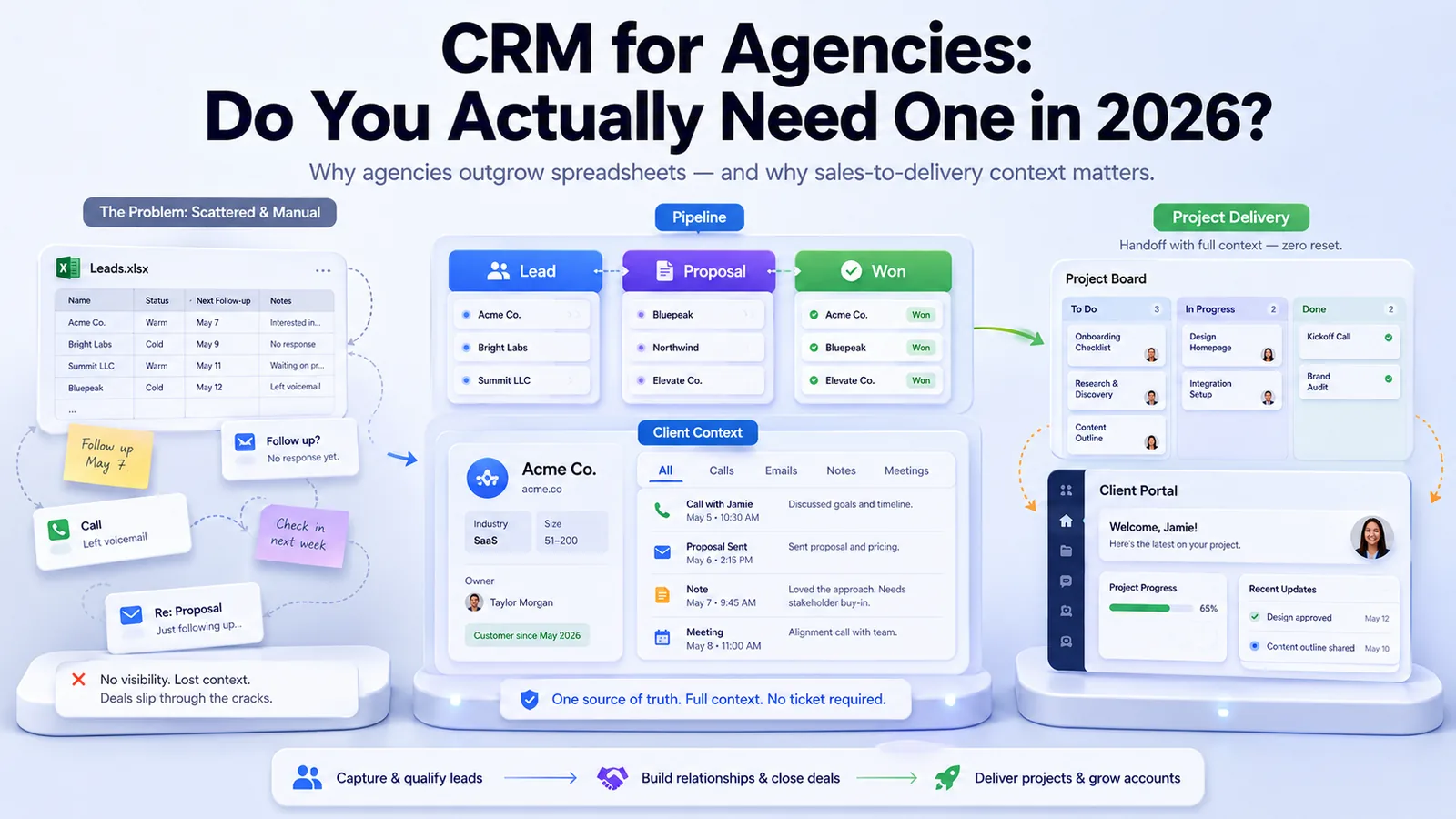
Strip away the enterprise jargon and a CRM for agencies does three things:
- Tracks every client interaction in one place - calls, emails, notes, proposals, and meetings are logged against the client record, not scattered across inboxes and sticky notes
- Manages your sales pipeline - you see every potential deal, where it stands, who is responsible, and what the next step is
- Preserves context across handoffs - when a lead becomes a client, the delivery team sees everything that was discussed during sales, not a one-paragraph summary in Slack
For agencies specifically, the third point is where most value lives. The gap between "we closed the deal" and "we started the project" is where context dies and client relationships take their first hit.
Signs Your Agency Needs a CRM (and Signs It Does Not)
You probably need a CRM if:
- You have more than 10 active prospects or leads at any time
- Multiple people on your team talk to clients or prospects
- You have lost a deal because someone forgot to follow up
- Your sales-to-delivery handoff relies on memory or a single Slack message
- You cannot answer "how many deals are in our pipeline right now?" in under 10 seconds
- Client history lives in individual email inboxes, not a shared system
You probably do not need a CRM if:
- You are a solo freelancer with fewer than 5 clients
- All your work comes from one or two referral sources
- You handle every client relationship personally from start to finish
- You are pre-revenue and still figuring out your service offering
The inflection point for most agencies is around 10-15 active client relationships. Below that, personal memory and simple tools can work. Above that, things start falling through cracks.
Why Generic CRMs Fail for Agencies
Here is the problem most agencies hit: they sign up for Salesforce, HubSpot, or Pipedrive, spend weeks configuring it, and then the team stops using it within two months. This is not a discipline problem. It is a fit problem.
Generic CRMs are built for sales teams that close deals and move on. Agency work is different. When you close a deal, the relationship is just starting. You need the CRM to connect with project delivery, not just track pipeline stages.
The disconnect looks like this:
- Sales closes a deal in the CRM and marks it "Won"
- Someone creates a project in a separate PM tool (Asana, Monday, ClickUp)
- The delivery team asks "what did we promise?" because the CRM notes did not transfer
- The client notices the gap when the kickoff meeting covers ground they already discussed
- Six months later, nobody updates the CRM because "the real work happens in the PM tool"
This is why combining CRM with project management is not a nice-to-have for agencies - it is the only way the CRM stays relevant past the first month.
What Agency CRM Features Actually Matter
Forget feature comparison charts with 50 line items. Here are the features that determine whether your team will actually use the CRM:
Pipeline visibility
You need to see every deal, every stage, and every next action at a glance. If checking your pipeline requires generating a report or clicking through five screens, nobody will check it. A visual pipeline that shows deals moving from lead to proposal to won is the minimum.
Call and interaction logging
Every call, email, and meeting should be logged against the client record. Not because you enjoy data entry, but because six months from now when the client references "that conversation we had about expanding scope," you need to find it in 10 seconds.
Deal-to-project conversion
When a deal closes, the project should spin up with the client context already attached. The delivery team should not have to ask sales what was discussed. This single feature eliminates the most common source of client frustration in agency work.
Multi-person pipeline management
Agencies rarely have one salesperson. Founders, account managers, and senior team members all contribute to business development. The CRM needs to support multiple people managing relationships without stepping on each other.
Integration with client-facing tools
If your clients interact with you through a client portal, the CRM should connect to it. Client feedback, support requests, and project updates should flow back into the client record so you have a complete picture of the relationship.
CRM Options for Agencies: Honest Comparison
Here is how the main options stack up for agency-specific needs:
HubSpot - Strong CRM with excellent marketing features. Free tier is generous. Downside: project management is limited, so you still need a separate PM tool. Gets expensive fast once you outgrow the free tier.
Pipedrive - Clean, sales-focused pipeline management. Easy to use. Downside: purely a sales tool with no project management, no client portal, and no delivery tracking. You will need 2-3 additional tools.
Salesforce - The enterprise standard. Extremely powerful and customizable. Downside: overkill for agencies under 50 people. Implementation takes weeks or months, and the cost is significant.
Monday.com - Visual boards that can be configured for CRM or project management. Downside: CRM and PM are separate products, the CRM is not purpose-built for service businesses, and there is no native client portal.
All-in-one platforms (CRM + PM + Portal) - Platforms like Droova combine CRM, project management, and a client portal in a single workspace. No integration complexity, no data silos, and the sales-to-delivery handoff happens inside one system. Best fit for agencies that want one tool instead of three.
The Real Cost of Separate CRM and PM Tools
Agencies often do not calculate the true cost of running disconnected systems. Here is what it actually looks like for a 10-person agency:
- CRM subscription - $50-150 per month
- PM tool subscription - $100-250 per month
- Client portal or communication tool - $50-150 per month
- Integration tools (Zapier, etc.) - $30-100 per month
- Time spent maintaining integrations - 2-4 hours per month
- Context lost in handoffs - immeasurable but real
Total: $250-650 per month in subscriptions alone, plus the operational overhead of keeping everything synchronized. An all-in-one platform typically costs less than the CRM subscription alone while covering all three functions.
How to Implement a CRM Without Your Team Ignoring It
The biggest risk with any CRM is adoption. Here is how to avoid the common pattern of enthusiasm followed by abandonment:
Start with pipeline only. Do not try to configure every feature on day one. Get your current deals into the pipeline, assign owners, and set next actions. Make it useful before you make it comprehensive.
Make it the source of truth for one thing. Pick one question the CRM answers better than any other tool: "What deals are in our pipeline?" or "When was the last time we talked to this client?" Once the team relies on it for that one thing, adoption spreads naturally.
Connect it to delivery. The CRM dies when the deal closes if there is no bridge to project management. Whether you use an all-in-one platform or set up integrations, make sure the CRM stays relevant after the sale. Connecting sales and delivery workflows is what separates agencies that retain clients from agencies that constantly churn.
Review it weekly. A 15-minute weekly pipeline review keeps the CRM alive. If leadership does not look at the CRM, the team will not update it. Make it part of your operating rhythm.
When to Move Beyond a Spreadsheet
Spreadsheets work until they do not. Here are the signals that it is time to move:
- You have duplicate entries because multiple people edit the same sheet
- You cannot see interaction history - just current status
- Follow-up reminders live in your head or your calendar, not attached to the deal
- Reporting means manually filtering and counting rows
- New team members cannot get up to speed on client history without asking around
If more than two of these are true, a CRM will save you more time than it costs to implement.
Key Takeaways
- Agencies need a CRM once they pass 10-15 active client relationships
- Generic sales CRMs fail for agencies because they stop at "deal closed" while agency work is just beginning
- The most important CRM feature for agencies is the bridge between sales and delivery
- Running separate CRM and PM tools costs more than most agencies realize - in money and in lost context
- Adoption depends on making the CRM useful for one specific thing before expanding scope
- All-in-one platforms that combine CRM, PM, and client portal eliminate the integration tax that kills standalone CRM adoption
Want to see how CRM and project management work together in one platform? Book a demo and we will show you a real agency workflow from lead to delivered project.
More from the journal
Tactics for running service businesses better - without the fluff.
Browse all posts →